Custom capes in Minecraft using cache poisoning
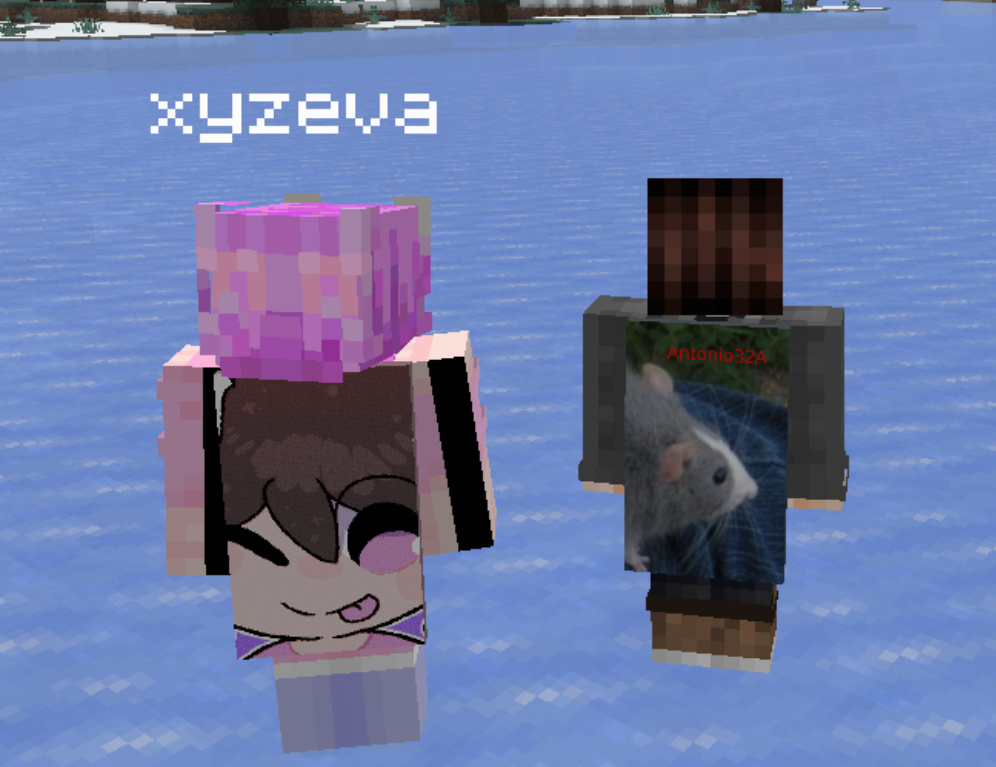 This exploit was found with the help of eva and @katietheqt, you should go check them out!
I was talking to a friend, and we got onto the topic of Minecraft player heads. Skulls are loaded from Mojang servers but this link itself is stored in the NBT of the skull, so I wondered if there was a way to tamper with this. Turns out there is!
Minecraft skin loading#
When your client loads a skull or a player, it needs to load it's skin.
The skin is stored in the profile, which contains properties like textures.
Here's an example of properties from a minecraft:profile item component on a player skull:
{
  "name": "textures",
  "value": "ewogICJ0aW1lc3RhbXAiIDogMTc2NDA0MTk3NDM1OSwKICAicHJvZmlsZUlkIiA6ICI2YzAyNTRkODFkOTA0MWJkYjc1ZmRjYTE0OTM1ZmQzZSIsCiAgInByb2ZpbGVOYW1lIiA6ICJBbnRvbmlvMzJBIiwKICAic2lnbmF0dXJlUmVxdWlyZWQiIDogdHJ1ZSwKICAidGV4dHVyZXMiIDogewogICAgIlNLSU4iIDogewogICAgICAidXJsIiA6ICJodHRwOi8vdGV4dHVyZXMubWluZWNyYWZ0Lm5ldC90ZXh0dXJlLzExYWRjOWYwMTBlY2Q5YjAxYjE5MGRiYmUzNTVlNjE5MDUzZGMzYTVlOWQzNDJlOWQ1NTJiYzQzOWQ3MGIyYjEiCiAgICB9LAogICAgIkNBUEUiIDogewogICAgICAidXJsIiA6ICJodHRwOi8vdGV4dHVyZXMubWluZWNyYWZ0Lm5ldC90ZXh0dXJlL2NkOWQ4MmFiMTdmZDkyMDIyZGJkNGE4NmNkZTRjMzgyYTc1NDBlMTE3ZmFlN2I5YTI4NTM2NTg1MDVhODA2MjUiCiAgICB9CiAgfQp9",
  "signature": "nh7oF/Gl3OfsRXQkStVnXz770i1a7Tva4pL/SSuYtZ6UIl6LZSI+NRAsI1kQdytxu85vQklAujpvPCOHkNEG9m0HKFDWaXU5E9SOt0rrdsqUJMt9oQyf8DIMLj5h9/LJdF8Ib+eRrBPrUSOtupNGIwTZRlBXTnQcr4wZhjlolMyvX9c5UVl4Y7zf/6pgGYWYzwNStvmKZ8IppBX6/3A3Ib56ngAPAXSFcFcYxG8iXKpfco24YZlaNJRzusMGcnbegNVadFwBakY5JZ/PTzoYLTXdsa7fWCW4tD8sY0YCI3rtNfGIxhDKxhBEC10v2a5y5K7obWq2EF8mSqsVrF+wKVsZlDQo6g4as0JLKuowtKWmJWdf2CzRBWfR8h9VIUBpASODc8zwxhKHIy29Lb1s+DQGQkBUAZk0mbDjgOV60poBGBkr8rC9mj5bYxS21ybvWQv7c+gkqk59xDXX0Q7V3ekKiRK5wdugddalKmIwjoZkHjx59wzcXXCxzchel3bbqMTxNde9XXbCoZOMN3EBANCYSRdpkZBbglpMwtL88biFY+JOYj7yTTws5E8fnt5XBrZO6zA/pE9nJ3uvXML3wWle2JZEuhM53Th+aKhwiSbiBkZzqhmfIw54UACJF/0sorG7duoi/YmBIYDmAfCET29Qp5iULR0Bk1k3oN236Qk\u003d"
}
Decoding the value from base64 gives you the following:
{
  "timestamp" : 1764041974359,
  "profileId" : "6c0254d81d9041bdb75fdca14935fd3e",
  "profileName" : "Antonio32A",
  "signatureRequired" : true,
  "textures" : {
    "SKIN" : {
      "url" : "http://textures.minecraft.net/texture/11adc9f010ecd9b01b190dbbe355e619053dc3a5e9d342e9d552bc439d70b2b1"
    },
    "CAPE" : {
      "url" : "http://textures.minecraft.net/texture/cd9d82ab17fd92022dbd4a86cde4c382a7540e117fae7b9a2853658505a80625"
    }
  }
}
The client then downloads the images from textures.minecraft.net and caches them.
What if we use a different host?#
By default, all textures will be loaded from textures.minecraft.net,
so what would happen if you used a different domain, perhaps one you own? This would let you load any texture
(but not sign it) and would also effectively let you IP grab and players who load in your skull as they'd have to
download it from your server. Fortunately, the Minecraft developers thought of this,
and built some logic to specifically prevent this, as when you try this it'll fail.
Looking at the Minecraft client console you see the following:
[04:47:38] [Worker-Main-20/ERROR]: Textures payload url is invalid: https://i.antonio32a.com/rat.png
Looking into the source#
Decompiling Minecraft is pretty easy these days, in fact there is even a web tool which does
all the work for you now. However, in my case I wanted to be able to debug this, so I opened up a
Fabric mod in Intellij and decompiled Minecraft using the genSourcesWithVineflower gradle task.
This lets you search through Minecraft using CTRL SHIFT F,
selecting Scope and setting Project and Libraries as your scope.
Searching for Textures payload url is invalid brings us to YggdrasilMinecraftSessionService:
@Override
public MinecraftProfileTextures unpackTextures(final Property packedTextures) {
    // <hidden for readability>

    final Map<MinecraftProfileTexture.Type, MinecraftProfileTexture> textures = result.textures();
    for (final Map.Entry<MinecraftProfileTexture.Type, MinecraftProfileTexture> entry : textures.entrySet()) {
        final String url = entry.getValue().getUrl();
        if (url == null || !TextureUrlChecker.isAllowedTextureDomain(url)) {
            LOGGER.error("Textures payload url is invalid: {}", url);
            return MinecraftProfileTextures.EMPTY;
        }
    }

    // ...
}
It calls TextureUrlChecker.isAllowedTextureDomain so let's see how that looks like:
public class TextureUrlChecker {
    private static final Set<String> ALLOWED_SCHEMES = Set.of(
        "http",
        "https"
    );

    private static final List<String> ALLOWED_DOMAINS = List.of(
        ".minecraft.net",
        ".mojang.com"
    );

    private static final List<String> BLOCKED_DOMAINS = List.of(
        "bugs.mojang.com",
        "education.minecraft.net",
        "feedback.minecraft.net"
    );

    public static boolean isAllowedTextureDomain(final String url) {
        final URI uri;

        try {
            uri = new URI(url).normalize();
        } catch (final URISyntaxException ignored) {
            return false;
        }

        final String scheme = uri.getScheme();
        if (scheme == null || !ALLOWED_SCHEMES.contains(scheme)) {
            return false;
        }

        final String domain = uri.getHost();
        if (domain == null) {
            return false;
        }
        final String decodedDomain = IDN.toUnicode(domain);
        final String lowerCaseDomain = decodedDomain.toLowerCase(Locale.ROOT);
        if (!lowerCaseDomain.equals(decodedDomain)) {
            return false;
        }
        return isDomainOnList(decodedDomain, ALLOWED_DOMAINS) && !isDomainOnList(decodedDomain, BLOCKED_DOMAINS);
    }

    private static boolean isDomainOnList(final String domain, final List<String> list) {
        for (final String entry : list) {
            if (domain.endsWith(entry)) {
                return true;
            }
        }
        return false;
    }
}
There's a lot to take in here, so let's go through it step by step:
- We first ensure the URL is valid and we are using HTTP or HTTPS
- We take the host from the domain (e.g. https://antonio32a.com -> antonio32a.com)
- We then perform a check to make sure domains like
😉.tldare correctly parsed - Finally and most importantly we check that the domain is on
.minecraft.netor.mojang.comand that it's notbugs.mojang.com,education.minecraft.netorfeedback.minecraft.net.
If everything succeeds, the client will attempt downloading and parsing the image (more on that later).
Using a different texture server#
This check may seem pretty strong, as it prevents you from using any random website, but minecraft.net and mojang.com have plenty of subdomains, so let's see if one hosts images. A good tool for this is crt.sh, which shows certificate transparency logs. Usually every single time you add a subdomain you'll issue a new SSL certificate for it (unless you use a root certificate), which will make it publicly visible. This is really handy as you can find many subdomains by just simply searching.
Searching for mojang.com shows us the following:
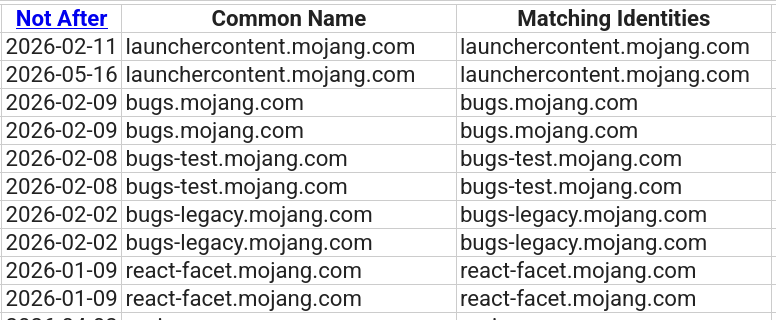
I picked bugs-legacy.mojang.com (as only bugs is blacklisted) and took the logo they have on the top left:
https://bugs-legacy.mojang.com/s/5xjfy6/9120002/1yf8rag/_/jira-logo-scaled.png
Creating a player head with this results in a broken head,
but looking at the logs we can see that it actually visits and downloads the image (as it knows the sizes).
[05:06:49] [Download-7/WARN]: Failed to load texture for profile 6c0254d8-1d90-41bd-b75f-dca14935fd3e
java.util.concurrent.CompletionException: java.lang.IllegalStateException: Discarding incorrectly sized (123x29) skin texture from https://bugs-legacy.mojang.com/s/5xjfy6/9120002/1yf8rag/_/jira-logo-scaled.png
	at java.base/java.util.concurrent.CompletableFuture.encodeThrowable(CompletableFuture.java:315) ~[?:?]
	at java.base/java.util.concurrent.CompletableFuture.completeThrowable(CompletableFuture.java:320) ~[?:?]
	at java.base/java.util.concurrent.CompletableFuture$AsyncSupply.run(CompletableFuture.java:1770) ~[?:?]
	at java.base/java.util.concurrent.ThreadPoolExecutor.runWorker(ThreadPoolExecutor.java:1144) ~[?:?]
	at java.base/java.util.concurrent.ThreadPoolExecutor$Worker.run(ThreadPoolExecutor.java:642) ~[?:?]
	at java.base/java.lang.Thread.run(Thread.java:1583) [?:?]
Caused by: java.lang.IllegalStateException: Discarding incorrectly sized (123x29) skin texture from https://bugs-legacy.mojang.com/s/5xjfy6/9120002/1yf8rag/_/jira-logo-scaled.png
	at knot/net.minecraft.class_10538.method_65863(class_10538.java:94) ~[client-intermediary.jar:?]
	at knot/net.minecraft.class_10538.method_65866(class_10538.java:35) ~[client-intermediary.jar:?]
	at java.base/java.util.concurrent.CompletableFuture$AsyncSupply.run(CompletableFuture.java:1768) ~[?:?]
	... 3 more
Unfortunately, it won't load the skin as the dimensions are wrong. Looking at the code it specifically looks for 64x32 or 64x64 images:
private static NativeImage remapTexture(NativeImage image, String uri) { // method_65863
    int i = image.getHeight();
    int j = image.getWidth();
    if (j == 64 && (i == 32 || i == 64)) {
        // loads the skin...
    } else {
        image.close();
        throw new IllegalStateException("Discarding incorrectly sized (" + j + "x" + i + ") skin texture from " + uri);
    }
All we need now is a 64x32 or 64x64 image, but what I really wanted is to upload a custom image.
bugs-legacy seemed like the perfect place to upload an image, as it's just Jira.
Looking at the code from before you can see that bugs is blocked, but the subdomain has been renamed so it's now accessible again.
This (or a similar bug) was probably patched previously so this seems like the perfect candidate.
Uploading images on minecraft.net#
At this point I got stuck and asked eva for help. We looked through bugs-legacy, but unfortunately everything
was locked. Jira has support for temporary uploads (e.g. when creating a comment or an issue),
but it actually properly validates and prevents you from temporarily uploading anything if the project is locked/archived.
Surprisingly, Jira also does not seem to have a media/image proxy, so you're able to just embed images from other websites,
which sucks for us since a media proxy would be absolutely ideal.
We ended up giving on Jira and went back to search for other subdomains.
Looking through certificate logs for minecraft.com we found our next target: edusupportppe.minecraft.net
This is the "Minecraft Education Support Center" which we had no idea even existed.
Looking at this it's pretty obvious that this is Zendesk and eva already knew how to upload files to it from
her previous adventures. We used this page which let us upload images.
$ curl -X POST --data-binary '@h.png' -H "Content-Type: text/plain" https://edusupportppe.minecraft.net/api/v2/uploads.json?filename=hello.png
This would give you a JSON response which contained:
"mapped_content_url":"https://edusupportppe.minecraft.net/attachments/token/iAZwkofmrs8o4eFfQF4nTYL0E/?name=hello.png",
We now had a way to upload any image we wanted and the client would download and attempt loading it.
Giving it a test with a random skin, and it loads just fine:

Capes#
Sadly skins were pretty limiting (64x32 / 64x64 max), so we moved to capes which is when we realized that capes have no limits.
We just need to be able to display them. Currently, the inability to sign this payload is preventing us from rendering
it on the player. Looking at how signatures are handled (specifically SkinTextures) we can find the following in PlayerListEntry:
private static Supplier<SkinTextures> texturesSupplier(GameProfile profile) {
    MinecraftClient minecraftClient = MinecraftClient.getInstance();
    boolean bl = !minecraftClient.uuidEquals(profile.id());
    return minecraftClient.getSkinProvider().supplySkinTextures(profile, bl);
}
This means that if the UUID of the player rendering the skin is the same one as the one who the skin belongs to,
it skips the signature check! This means other players in the same world won't see the custom cape, but our own client should.
Using a Spigot plugin we replaced the texture in the player's profile and got the following:
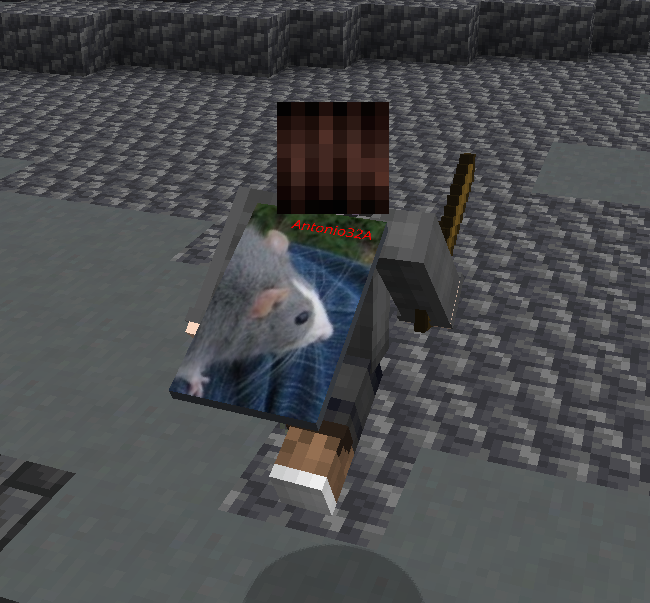
It works! The player loads and sees a completely custom cape. As mentioned only the player will see this, as Minecraft directly enforces signatures on other player skins (so the servers cannot spoof them). Regardless, this is very cool as now you can have custom (HD) clientside capes.
Digging deeper#
The next day we decided to dig more into the way that Minecraft handles caching these textures.
Looking at the source of PlayerSkinProvider you can see the following:
private final PlayerSkinProvider.FileCache skinCache;
private final PlayerSkinProvider.FileCache capeCache;
private final PlayerSkinProvider.FileCache elytraCache;
Each type of texture has its own cache, which prevents us from mixing cape and skin textures. The textures themselves
are internally (in PlayerSkinProvider.FileCache) stored in a map:
private final Map<String, CompletableFuture<AssetInfo.TextureAsset>> hashToTexture = new Object2ObjectOpenHashMap<>();
Let's see how accessing a texture looks like:
public CompletableFuture<AssetInfo.TextureAsset> get(MinecraftProfileTexture texture) {
    String string = texture.getHash();
    CompletableFuture<AssetInfo.TextureAsset> completableFuture = this.hashToTexture.get(string);
    if (completableFuture == null) {
        completableFuture = this.store(texture);
        this.hashToTexture.put(string, completableFuture);
    }

    return completableFuture;
}
We first get the hash and check if we already have it, if not we fetch it and store it. This all looks normal, and you'd assume that the hash is just the SHA1 of the texture URL, or just an actual hash of the image data. However, looking at the source code you'll find something else:
public String getHash() {
    try {
        return FilenameUtils.getBaseName(new URL(url).getPath());
    } catch (final MalformedURLException exception) {
        throw new IllegalArgumentException("Invalid profile texture url");
    }
}
It's actually just the name of the path! We control the URL, so surely if we find a way to upload our image with a specific path, we can poison the cache and replace other textures!
Uploading images with a custom path#
We needed to find another way to upload images, as currently we could only upload with a random path. @katietheqt found yet another way to upload images to the same Zendesk instance, this time by using the "Minecraft: Education Edition Self Helper". You know, the little annoying support popup that is on the bottom right of every single website nowadays.
Uploading an image doesn't actually load it directly, it instead gives you a link on p20.zdusercontent.com:
https://p20.zdusercontent.com/api/v2/attachment_content/01KC4Y388GARBA69F02E7KN46Q?token=...
However, we can take this ID from the link, and format it as such:
https://edusupportppe.minecraft.net/sc/attachments/v2/01KC4Y388GARBA69F02E7KN46Q/dennis_ritchie.png
We get a link that redirects us to the image, but allows us to put anything as the path!
Putting it all together#
Now that we can upload images with custom paths, we need to correctly poison the cache so that we render a custom cape. The easiest way to do this is by showing a skull with a plugin, but we run into two problems:
- We cannot inject capes onto players, we can only override their current one.
- Replacing a common cape such as the migration cape will replace all instances of it. This means our custom cape will be shown on more than one player which is not ideal.
- We need to somehow load the skull before we load our own skin (or somebody else's), which is easier said than done.
- Players most likely have common capes already cached, so this won't work on them.
The solution: replace the player's skin with a different one, which has a very rare cape.
Looking at all the capes on NameMC we can find a few which are owned by a single player.
A great example is the snowman cape owned by only one player:
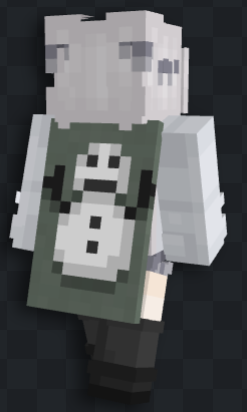
Most users have not naturally come across this player, so they won't have the texture already cached and only one player owns the snowman cape, so it will only be visible on our skin. Here's how the entire process looks like:
- We join the server and run a command with the link to our custom cape.
- The plugin downloads the cape and uploads it to Zendesk alongside our skin texture.
- It picks an account from a list of rare cape accounts (such as the snowman one).
- It spawns a skull at every online player (including us), where the skin and the cape textures are hosted on
edusupportppe.minecraft.netand match the IDs of the picked account's cape and skin. This skull is killed a tick later, as the client already caches the textures. - Finally, the plugin sets/replaces our player profile to the one of the picked account.
Now, since our (and everybody else's) client has loaded the textures already from the skull, and those textures match
the profile that has replaced ours, we have our own very cool custom cape:
We ended up making a nice plugin for this, you can find it here.
In the end#
We also wondered what else you could do with this, technically you could use this to replace skins, but since skins are validated when loaded (instead of when downloaded), you couldn't have HD skins. You could go around creative servers and replace skins of other players, but it would only work with players who only join the server after, and you'd have to specifically know which players those would be.
You can download files to the users' computers this way (as invalid skins are not deleted), but that's not too interesting as resource packs can already do this, so it's not something new. Also, since we can make other players download the image from any Mojang-owned subdomain, if one of those subdomains has an open redirect you could use this to grab IPs of other people as the client follows redirects. We did not find any subdomains with open redirects, but maybe we did not look deep enough.
The custom capes are pretty neat, but are very impractical to pull off.
You could technically use this for a custom admin cape, but the effort is probably not
worth it. In the end, we ended up reporting this to Mojang, and after a long month of waiting, they fixed it in
Minecraft 26.1 Snapshot 5 by making it so all textures can only be downloaded from textures.minecraft.net.